How to use AI to edit your social media posts (without sounding like a robot)
AI is great at tightening a draft and terrible at having something to say. Here’s a simple workflow for using AI on your posts while keeping your own voice.
5 minute read

Software engineer and SaaS founder

In this article
You can spot an AI-written post from across the room. It opens with “In today’s fast-paced world”, it has three emoji per line, and it says absolutely nothing.
That’s not because AI is useless for social media. It’s because it’s being used for the wrong job. AI is a brilliant editor and a pretty poor author. Give it your rough idea and it can make it clearer and shorter. Ask it to come up with the idea and you get filler.
This guide shows a simple workflow that uses AI for what it’s good at, and keeps you in charge of the rest.
In short: write the rough draft yourself, ask AI for one specific improvement at a time, read every suggestion out loud, and never publish anything you haven’t reviewed.
What AI is good at (and what it isn’t)#
| AI is good at… | AI is bad at… |
|---|---|
| Making a long draft shorter | Knowing what you actually think |
| Suggesting a punchier first line | Your stories, results and opinions |
| Fixing grammar and awkward phrasing | Knowing what happened this week |
| Adapting a post for a different network | Sounding like you without help |
| Offering three versions to choose from | Telling you which one is true |
Keep that table in mind and most of the bad AI posts you’ve seen start to make sense. They’re what happens when the right column gets handed to the machine.
Step 1: Write the ugly first draft yourself#
The thing that makes a post worth reading is the part only you can provide: a specific story, a number, a lesson, an opinion.
So start with a rough draft. It doesn’t need to be good. Bullet points are fine:
- customer cancelled last week, said too expensive
- called them, turned out they were paying for 9 channels, using 3
- helped them remove 6, they stayed, now on yearly
- lesson: “too expensive” often means “paying for stuff I don’t use”
That’s the hard part done. Everything after this is polish.
Step 2: Ask for one specific change at a time#
Vague requests get vague results. “Make this better” produces the fast-paced-world post. Specific requests work much better:
- “Turn these notes into a LinkedIn post of about 150 words. Keep my wording where you can.”
- “Give me three alternative first lines. Make them shorter than 12 words.”
- “Cut this by a third without losing the lesson at the end.”
- “Rewrite this for X in under 280 characters.”
- “Fix the grammar only. Don’t change the tone.”
One change at a time also makes it easy to see what the AI did, and to reject it if you don’t like it.
Step 3: Read it out loud#
This is the single best test for AI-edited text. Read the post out loud. If any sentence sounds like something you’d never say, change it back.
Watch out for the usual giveaways:
- Buzzwords you don’t use: “leverage”, “unlock”, “game-changer”, “delve”.
- Empty openers: “In today’s world…”, “Let’s dive in…”.
- Too many emoji or hashtags you’d never add yourself.
- Made-up specifics. If the AI added a number or a claim, check it. If you can’t check it, cut it.
Step 4: Tailor it for each network#
AI is genuinely handy for adapting one post to several networks, because that’s mostly a rewriting job:
- A longer, story-led version for LinkedIn.
- A short, sharp version for X, Threads and Bluesky.
- A caption that supports the image for Instagram.
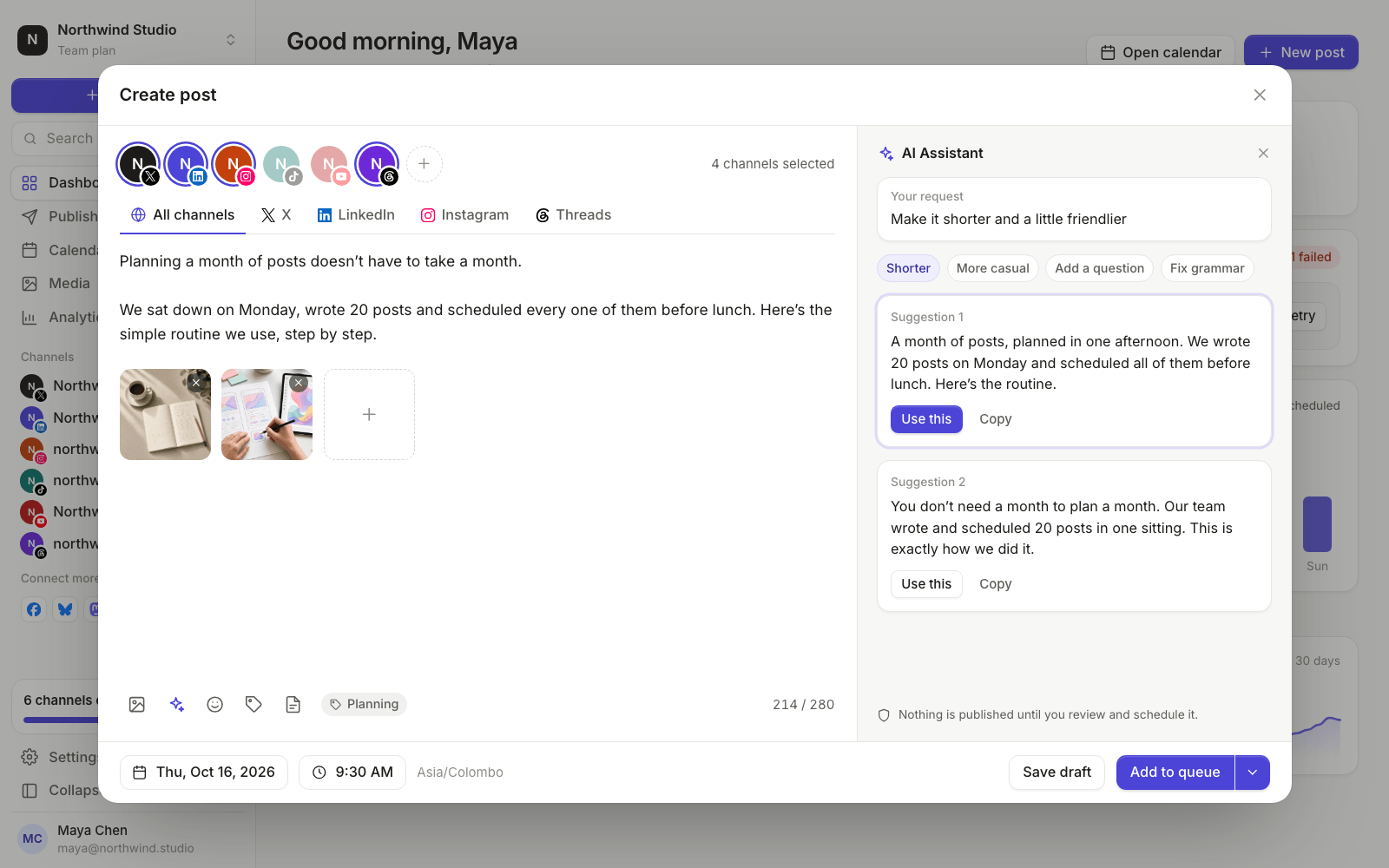
In PostGic, write the main version in the global editor, then click each channel to adjust its text. The AI Assistant can suggest a rewrite while you’re there. We go deeper on writing for each network in how to schedule LinkedIn posts and how to schedule Instagram posts.
Step 5: Review, then schedule#
Whatever tool you use, you are the last line of defense. Before anything goes out:
- Is everything in the post true?
- Does it sound like you?
- Would you be happy to reply to comments on it?
PostGic’s AI Assistant, powered by OpenAI, only suggests. Nothing is published until you review it and schedule it yourself, which is exactly how it should be.
Then schedule the post as usual, at a set time or into your queue. If you’re planning a whole week at once, our guide to building a content calendar shows how to batch it.
A few prompts worth saving#
Save these as templates so you’re not retyping them every week:
- Tighten: “Cut this to about 100 words. Keep my phrasing and the ending.”
- Hooks: “Give me 5 first lines for this post, each under 12 words, no buzzwords.”
- Adapt: “Rewrite this for X in under 280 characters, plain language, no hashtags.”
- Proofread: “Fix spelling and grammar only. Don’t change the tone or add anything.”
- Simplify: “Rewrite this so a 12 year old could follow it.”
Common questions#
Will people know I used AI?#
Not if it’s still your idea, your story and your voice. People notice AI posts because they’re generic, not because a tool fixed a comma.
Do social networks penalize AI-written posts?#
What networks care about is whether people engage with a post. Generic posts tend to get ignored, whoever wrote them. Specific, honest posts tend to do well.
Should I disclose that I used AI?#
For editing help, like grammar or shortening, most people don’t. If AI created images or video that could be mistaken for real, check each network’s rules, as several ask you to label AI-generated media.
Keep your voice, borrow the editor#
Write your rough idea, let AI tighten it, read it out loud, and schedule it. You’ll post more often without sounding like everyone else.
The AI Assistant is built into PostGic’s composer. See all features, or get started for free.

 Anuj Shashimal